

How to read your water meter
All properties linked to our network have a meter to record water usage and in most cases they can be found near the front of the property.
Urban customers
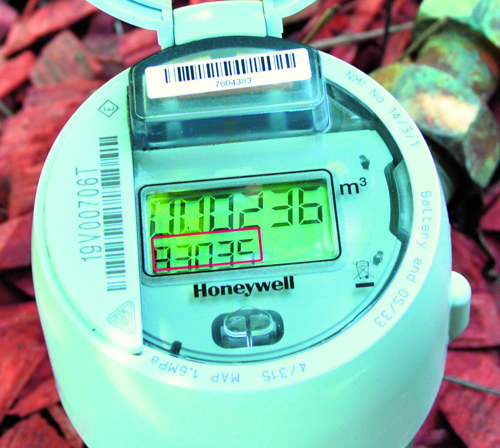
The top row of numbers on your remote water meter shows your accumulative water use in cubic metres/kilolitres, and appears on your water bill for billing purposes.
The adjacent reading shows 236m³ which is 236 kilolitres or 236,000 litres. Your old meter showed this on the white dials.
The bottom row of numbers counts up to 999.99 litres, adding a kilolitre to the top row of numbers before clocking over to zero.
The last two digits are 0.01 of a litre. The above reading shows 830.35 litres used. Your old meter showed this on the red dials.
If you live in Kaniva, your water meter may be different from others. Click here to see a simple guide on how to read it.
Rural customers
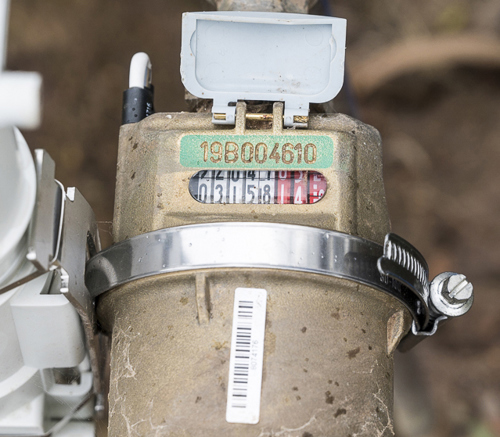
The black numbers from the left show the reading in kilolitres.
The red numbers indicate hundreds of litres, tens of litres and litres, respectively.
Use your meter to calculate your water costs
Calculating your water usage costs is relatively simple. The first thing you need to do is calculate your water usage!
See your previous water bill to check what your water meter reading was last time.
Urban
Rural
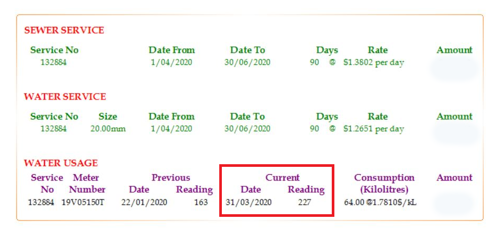
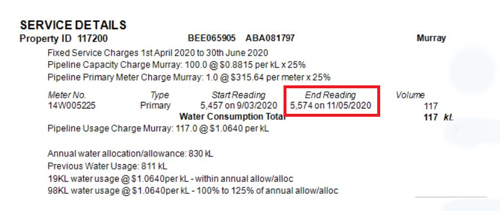
Check the top row of numbers (urban) or black numbers (rural) on your current water meter reading.
Subtract your previous water meter reading from your current water meter reading for an indication of your current water usage.
Example:
Account
Meter reading
Current
8,879 kL
Previous
8,795 kL
Water usage
8,879 kL
-8,795 kL
= 84 kL
Now that you have your water usage you can calculate cost by simply multiplying your water usage by the current volumetric charge rate.
The volumetric charge rate varies based on the quality of water that you are supplied with. To find out how much you pay per kilolitre of water, please refer to the second page of your GWMWater water account, or click here to see our tariffs and charges.