GWMWater

Online billing (eNotices)

eNotices allows you to receive your water bill by email. It is a simple way to access, view and pay your bill online. You can sign up at any time.

Why choose eNotices?

By registering for eNotices, you can:

  • Receive and pay your water bill online.

  • Manage accounts for multiple properties.

  • Send bills to more than one email address.

  • Access your bill on any device.

  • View current and past bills.

  • Make payments online using credit card, Apple Pay or Google Pay.

How to sign up

  • Find the eNotices logo on your water bill. You can find this on the first page of your most recent water bill.

  • Use this code to register at gwmwater.enotices.com.au

Your water bill will then be emailed to you and you can view and pay it online.

Important to know:

If you are registered for the Customer Portal, you will still need to sign up separately for eNotices to receive your bill by email.

If you prefer to receive your bill by post, you don’t need to take any action. Your bill will continue to be mailed to you each quarter.

Reference number FAQs

Where is my eNotices Reference Number?

The eNotices Reference Number is unique to your most recent water bill and is located on the first page of your water bill.

There will be the eNotices ‘e’ logo next to it.

It says my eNotices Reference Number is invalid

If you are having issues with your eNotices Reference Number, please contact us on 1300 659 961 during business hours.

Email and password FAQs

I did not receive my email validation link

Please check the Junk / Spam folders in your email account.

If you still have not received it, please contact us on 1300 659 961 during business hours.

I forgot my password

You can reset your password using the ‘Forgot Password’ button on the eNotices login page.

How can I update my email address?

To update your email address, go to the ‘Profile’ tab in the eNotices dashboard, enter your new email address and click ‘Save’.

To start receiving your bills at your new email address, you will need to verify it. From your Profile page, click ‘Resend verification’ and follow the prompts in the email.

Can water bills be emailed to more than one person?

Yes. Once you have registered for eNotices, you can add additional email addresses to receive your bill.

To do this, go to the ‘Emails’ tab in the ‘Profile’ section of the eNotices dashboard. Enter the email address and click ‘Add’.

Can I unsubscribe from emailed water bills?

If you no longer wish to receive your water bill by email, you can choose to receive it by paper instead.

Under the ‘Accounts’ tab on your ‘Profile’ in the eNotices Dashboard, you can change your delivery method.

If you choose 'Post', your future water bills will be sent to the last advised mailing address.

Could my water bill go to my Junk / Spam email folder?

While we do all we can to ensure your notice goes directly to your email’s inbox, it is possible that it will go into another folder such as ‘Promotions’, ‘Updates’ or ‘Junk / Spam’.

Please check your 'Junk / Spam' folders and mark the sender as safe to receive future water bills to your inbox.

FlexiPay FAQs

What is FlexiPay?

FlexiPay is a payment management system that provides our customers with flexible payment options for their water bills.

How do I set up FlexiPay?

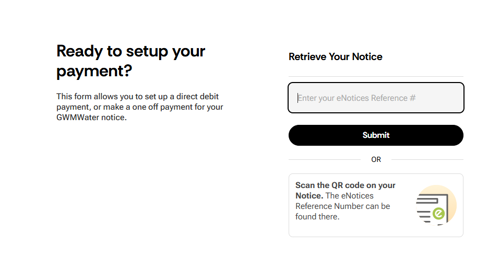
Step 1: Visit the website

  • Scan the QR code (located on the front page at the bottom of your latest water account).

Or visit gwmwater-pay.enotices.com.au. Make sure you have your eNotice reference number (located on the front page of your latest water account) before you start.

Step 2: Your details

  • Check your details are correct that have autofilled.

  • Enter your mobile number and email address.

  • Click Submit.

Confirm_Contact_Details_Flexipay.jpeg

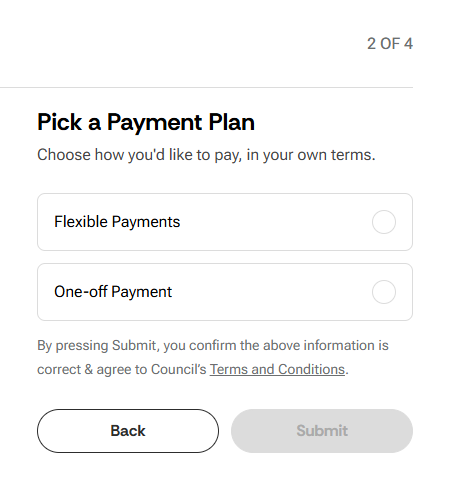
Step 3: Choose your payment option

  • Select your preferred payment option and follow the prompts to set up payment details.

If you choose 'Set up Direct Debit', an email from noreply@entoices.com.au with a link will be sent to you. Please click on the link to enter your payment details.

Payment_Details_Flexipay.jpeg

What types of payments can be made via FlexiPay?

You can:

  • Make a one-time payment of your water bill

  • Set up an ongoing direct debit schedule

What payment methods are accepted?

Payments can be made via either credit card (Visa, Mastercard, as well as international credit cards) or via bank account.

One-time payments can also be made via Apple Pay and Google Pay on compatible devices.

FlexiPay asked for my eNotices Reference Number. Do I need to have an eNotices account to use it?

No, FlexiPay can be used by all GWMWater customers, even if you don’t have an eNotices account.

The eNotices Reference Number is used by the system to easily find the details of your notice such as the Name, Account Number, and Amount Due.

FlexiPay says my eNotices Reference Number is invalid.

Please check that you have typed the code in correctly, and ensure there are no spaces at the beginning or end of the reference number.

If you are having trouble with your eNotices Reference Number, please contact us on 1300 659 961 during business hours.

I have applied for ongoing direct debit. What happens now?

All direct debit requests are sent to our team for review. You should hear from us within three business days regarding the outcome.

If your request is approved, you will receive an email confirming the details, with a link to securely enter your payment method.

If we have any questions or want to discuss your proposed direct debit arrangement with you, we may contact you via the email or phone number provided in the request.

Why do I need to receive an email to give my payment method details?

If you are setting up a direct debit schedule, FlexiPay will send you an email with a secure link to provide your payment method details.

This is to make sure that the email address you have entered is valid, so we know that you will receive emails regarding the schedule (such as transaction receipts, card expiry reminders, or updates to your schedule).

How can I see the details or amend details of my payment schedule?

If you have an eNotices account, you will be able to see the details of your payment schedule in the ‘Manage Payments’ tab in the Dashboard.

If you do not have an eNotices Account, please contact us and we can provide these details to you by phone on 1300 659 961 during business hours, or via email at customerpayments@gwmwater.org.au

Other FAQs

Can I register to receive water bills from multiple properties?

Yes. If you have multiple properties with GWMWater under the same name and postal address, they will be automatically grouped and added to your account when you register.

If your properties are under different names or postal addresses, you can add them in the ‘Accounts’ tab within the ‘Profile’ section of the eNotices dashboard.

Note: If your properties are registered under different names or postal addresses, you will receive a separate email for each property.

I’m already signed up for the GWMWater Customer Portal. Will I have to sign up for eNotices to receive my water bill via email?

Yes. If you’re registered for our Customer Portal, you will still need to register for eNotices if you would like to receive your water bill via email.

Will I be able to see water bills on my eNotices account prior to October 2023?

No, at this point in time you will only be able to see your water bills from October 2023 on your eNotices account.

Why is the ‘Mobile Phone Number’ a required field?

Your mobile number is collected if we need to communicate with you via SMS in the future.

I’m a tenant. What happens if I move address?

When you move into a new rental property, your eNotice reference number will move with you. You will have access to your water bills relating to your previous tenant property up until the day you moved out.